AI workflows6 min read
From order straight to a print-ready PDF
Preparing print files for each custom jersey used to take me roughly half an hour in Illustrator. Today, an n8n automation on my own server handles it. Together with an AI agent, I took it from the initial brief into production.
I built a 3D jersey configurator for my online shop thtd.cz. Customers choose a size, sleeve length, three colors, and a name for the back. I wrote it in Three.js in 2024, before I had an AI agent to help me.
It worked well. The work started when an order came in. I’d open Illustrator, find the template for the right size, and use my own lookup table to map the selected HEX colors to CMYK. Then I’d swap the colors, change the name, and export the print files. Roughly 30 minutes per jersey.
I thought an automation could do this. An order comes in, and a few minutes later there’s a finished print-ready PDF on my Drive. Now that would be something.
The first version in Make.com
I was learning to build automations in Make.com at the time. I started looking for a library that could edit PDFs programmatically. Back then, though, I couldn’t find a free one that could handle CMYK print colors.
I picked specific CMYK colors from my supplier’s swatches and matched them to HEX equivalents. A tool that recalculated those values along the way would quietly change the colors, and they would no longer match what the customer saw on screen.
So I changed my goal. The automation wouldn’t create the print files itself. It would write a JSX script that would create them for me in Illustrator.
The Make.com scenario had a few steps. An order comes in from Shopify, only the custom jerseys are selected, and each jersey’s size, sleeves, colors, and name are read. One branch added a row to the orders spreadsheet. The other assembled an Illustrator script and uploaded it to Drive. I’d then run that script in Illustrator with the template open, and it would swap the colors and name for me.
Along the way, I ran into something I hadn’t expected: Make Core couldn’t run custom code. I had to pay for an extra service, 0CodeKit, to add JavaScript execution to the scenario.
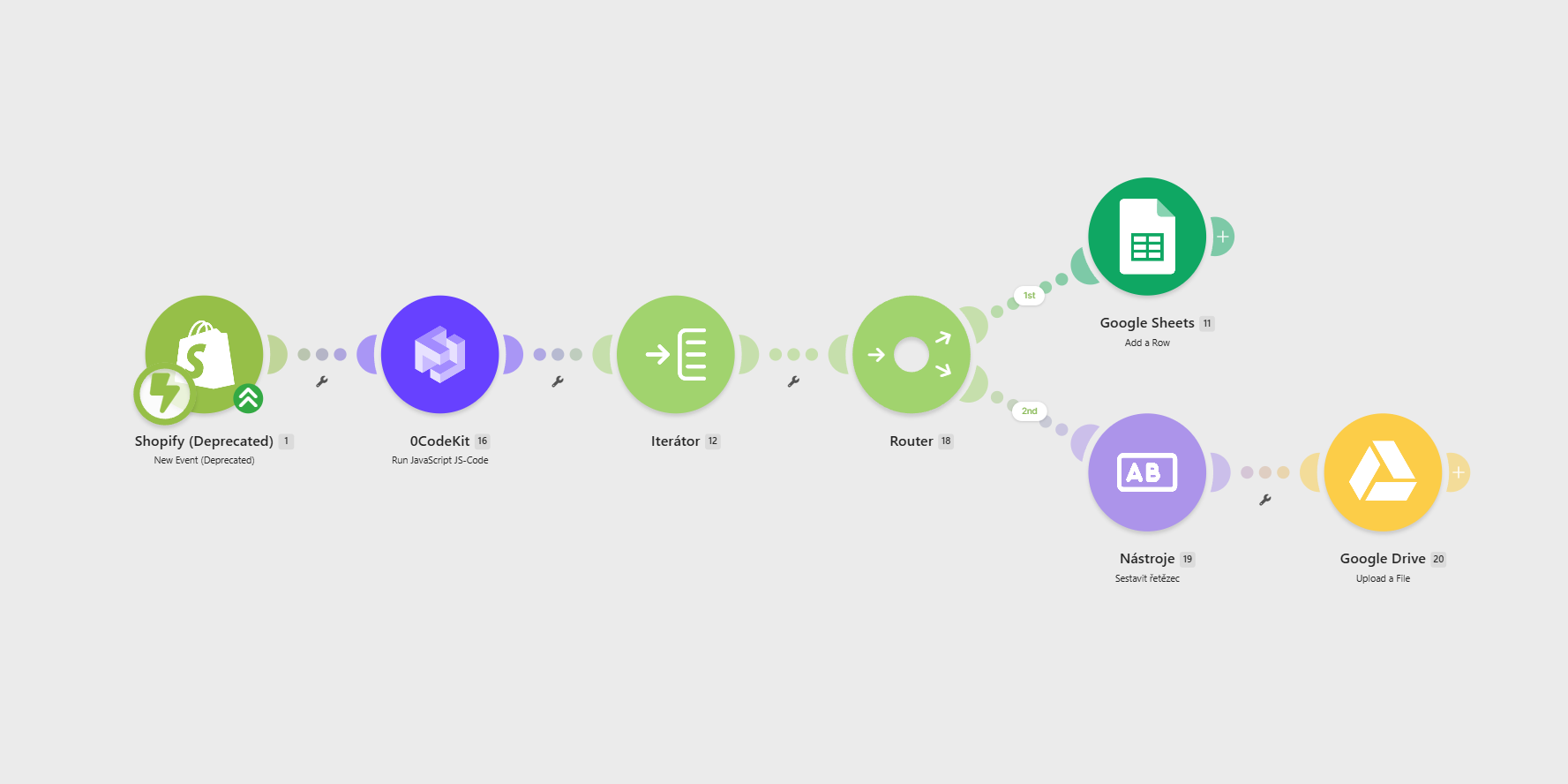
I was paying USD 26 a month for this setup:
| Tool | What it did | Price |
|---|---|---|
| Make.com | ran the scenario | $9 |
| 0CodeKit | executed JavaScript | $7 |
| Globo Product Options | collected jersey options | $9.90 |
Sixteen dollars a month for the automation, another ten for the plugin that collected the options in the first place. I still had to open Illustrator, but I no longer changed the colors by hand. Even so, that was quite a lot of money for what it did.
AI arrives, along with my own server
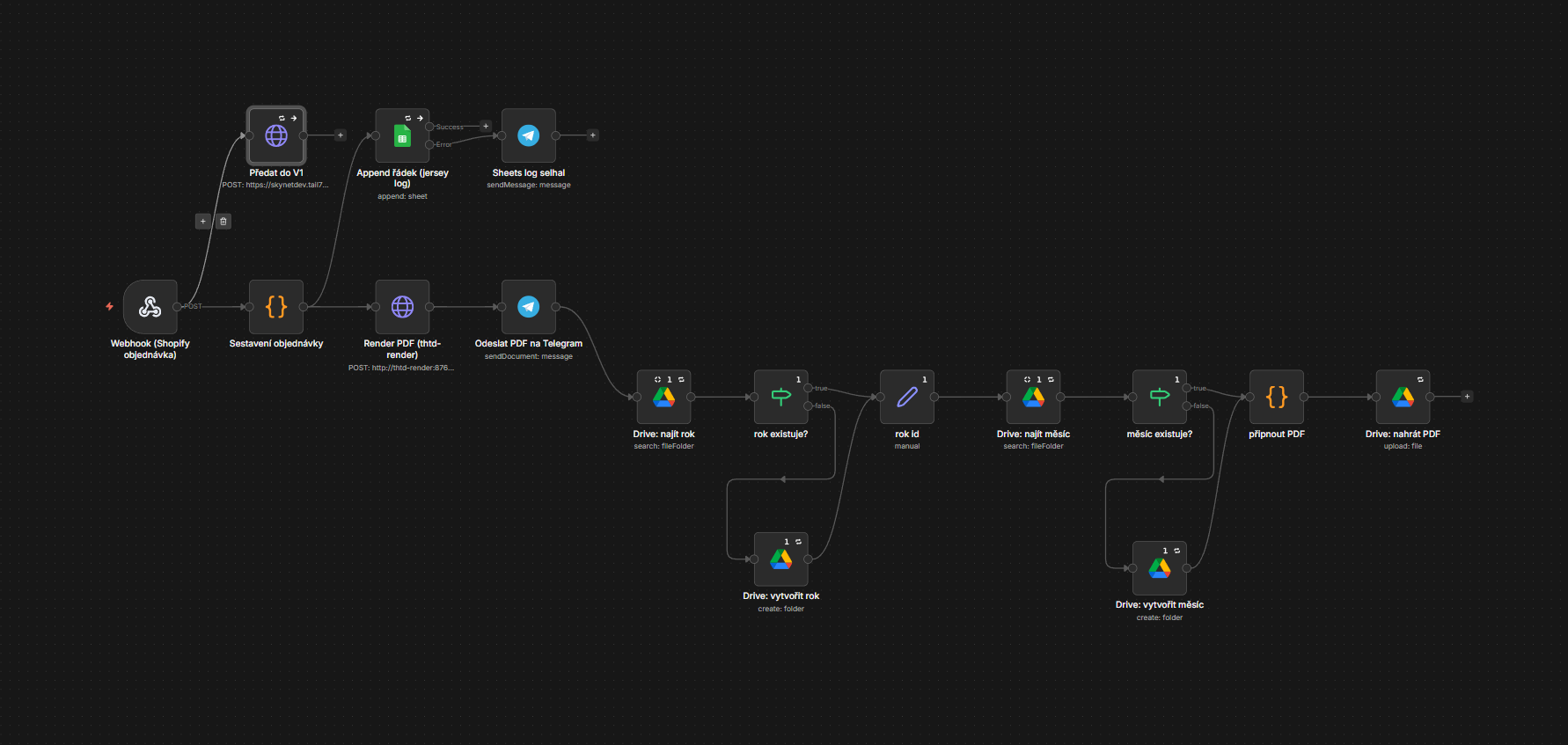
I bought a mini PC for home, installed Linux, and turned it into my own server. That let me install self-hosted n8n and replace Make and 0CodeKit.
In the meantime, AI models had matured enough for my dream to come true. Over a few sessions with an AI agent, I refined the specification. In the sessions that followed, we built it, tested it, and put it into production.
And it works exactly as I’d imagined. For each custom jersey design, I have a set of templates for the different sizes, with separate layers and indexed colors. The automation finds shapes with indexed colors in the template and replaces those colors with the ones ordered. It removes the layers for the sleeve length that isn’t needed and saves the print-ready PDF to Google Drive. No recalculation, no pass through a rendering engine. The numbers stay exactly as they came out of Illustrator.
The automation also inserts the name into the print file. It calculates its width in the chosen font, centers it within the area marked in the template, and reduces the font size if needed. The width of individual letters matters too, not just the character count. There is a lower limit: 40% of the original font size. If the name still does not fit, generation stops and I receive a notification that a manual adjustment is needed.
What checking the output revealed
While checking the output, we found a PDF that passed the automated checks we had at the time, but neither Acrobat nor Illustrator would open it. Removing one of the sleeve layers had broken the pairing of internal PDF instructions. The agent and I corrected the layer removal and added a check to catch the same problem. The fixed file opened in Acrobat too.
For each design, a validation script generates output in all five sizes, with both short and long sleeves. It then independently checks that no placeholder colors or content from removed layers remain in the PDF, and that no RGB colors have slipped in.
What’s running today
An order comes in, and a few minutes later I have the finished print files on my phone. A copy is automatically archived by year and month. If something is missing, I get a message explaining what happened instead of the files. Eventually, while rebuilding my Shopify theme with the agent, I also replaced the Globo Product Options plugin with my own solution. That eliminated roughly USD 26 a month in subscriptions to Make.com, 0CodeKit, and Globo Product Options.
The customer sees just one thing: their files go to production on the day they order, rather than whenever I get around to it. The whole workflow is ready for new custom designs, too, with no code changes needed.
Two years passed between the initial idea and the finished automation. Today, the picture I had in mind at the start matches reality exactly: an order comes in, and the print files create themselves.

Jiří Ryšánek
Digital designer with over twenty years of experience. I use AI and code to build websites and interfaces. I develop in a multi-agent environment and run automations for my own online shop.
Work and contact